
Have you ever searched for something like “coffee shop near me” or “best plumber in Toronto”? If so, you’ve already used what’s called local search intent; it means you’re looking for something nearby, and usually, you’re ready to act fast.
Now here’s why this matters for businesses:
46% of all Google searches are looking for local information.
(Source: Google via Think With Google)
And 88% of people who do a local search on their phone visit or call a business within 24 hours.
(Source: Nectafy)
That’s a huge opportunity for local businesses but only if your website, Google profile, and content are actually showing up for these searches.
In this guide, I will explain what local search intent means, how Google understands it, and what you can do to make sure your business appears in front of people looking for what you offer.
Whether you run a restaurant, moving company, salon, or you’re working in franchise marketing or local SEO this guide will make local search intent easy to understand and act on.
What Is Local Search Intent?
Local search intent means someone is looking for something nearby whether it’s a service, product, store, or place to visit.
They’re not just browsing; they usually want to take action soon like making a call, visiting a location, or booking a service.
Think of it this way:
If someone types “emergency dentist near me,” they’re clearly not just reading for fun they need help, now. That’s the power of local intent.
Types of Search Intent (Made Simple)
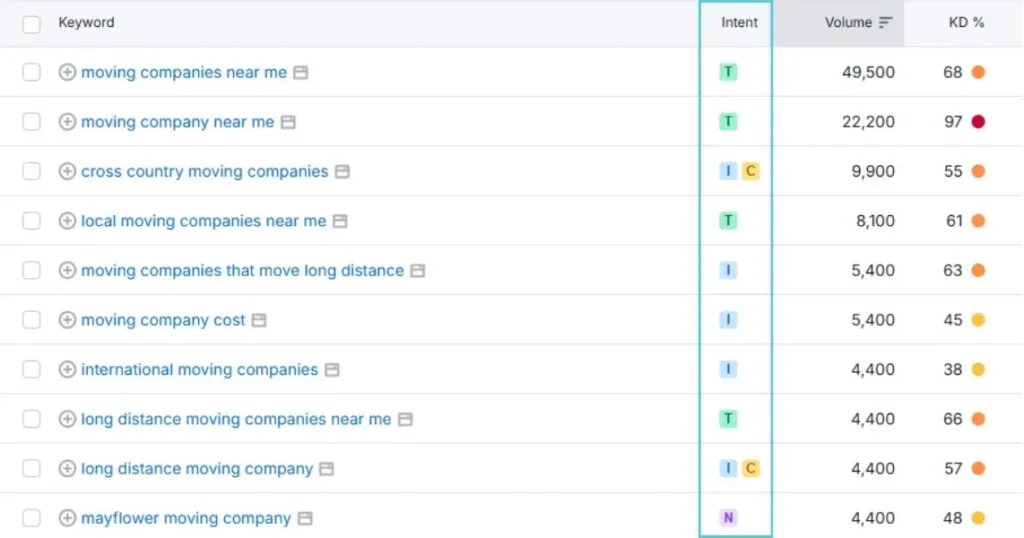
Google generally classifies search intent into 3 main types:
- Informational: The person is looking for information.
Example: “how to fix a leaky faucet” - Navigational: They want to find a specific place or brand.
Example: “Home Depot Calgary hours” - Transactional (Commercial): They’re ready to buy, call, or book.
Example: “best HVAC repair near me”
Local searches often fall under navigational or transactional intent. That’s where business opportunities come in.
Examples of Local Search Queries
Here are some common searches that show clear local intent:
| Search Term | What It Means |
| “best pizza near me” | Looking for nearby restaurants |
| “movers in Vaughan” | Looking for a local moving company |
| “24/7 plumber Toronto” | Need emergency service locally |
| “hair salons open now” | Ready to book right away |
| “dentist near me with good reviews” | Comparing options, ready to decide soon |
According to Google, searches that include the phrase “near me” have grown by over 500% in the last few years and they keep climbing.
Why Local Search Intent Is Critical for SEO Success
The reason local seo matters is that when people search on Google, they don’t just want any result they want the right result based on what they’re really trying to do.
This is where Google’s understanding of search intent comes in. And if your business doesn’t match that intent, you simply won’t show up.
How Google Understands Local Intent
Google is smart. It looks at location, keywords, search history, and even time of day to figure out if someone’s looking for something local.
For example:
- Someone types “Mexican food” at 7:00 p.m. from their phone Google knows it’s likely a local, immediate search.
- Someone types “Toronto car insurance quotes” Google shows local providers, not general articles.
That’s because Google uses intent signals like:
- The presence of keywords like “near me,” city names, or postal codes
- The device being used (mobile = more urgent)
- User location (via GPS or IP)
Fact: 78% of local mobile searches result in an offline purchase.
(Source: Junto/Google)
That’s why aligning your content and SEO with local intent is so important.
How Local Intent Affects Rankings and Conversions
If your content doesn’t match what the searcher wants, Google pushes you down in the results simple as that.
But when you match the intent:
- You get more qualified traffic
- Visitors are more likely to call or book
- Your conversion rate increases
Let’s say you run a moving company.
If your page targets the keyword “moving tips,” you’ll get people looking for advice.
But if you target “local movers in Vaughan,” you’ll get people looking to book a move.
More relevant content = Higher rankings + Better leads
How to Identify Local Search Intent
If you want your business to show up for local customers, you first need to know which keywords actually have local intent.
Not all searches are created equal; some are global (“how to fix a faucet”), and some are local (“plumber near me”). Here’s how to tell the difference.
Look at the SERP (Search Engine Results Page)
One of the easiest ways to spot local search intent is to Google the keyword and check what shows up on the results page.
If you see these features, it’s a local-intent keyword:
- Map Pack (Google Maps results with 3 listings)
- Star Ratings & Reviews
- Business Hours
- Call Buttons (on mobile)
- Location-Based URLs (like “moversintoronto.com”)
These tell you that Google considers the search local, even if the phrase doesn’t include “near me.”
Try it: Search “best electrician” and “how to become an electrician”.
The first one shows local business listings. The second shows blog posts and guides.
Use SEO Tools to Confirm Local Intent
Here are a few tools that can help you dig deeper:
SEMrush or Ahrefs
- Look at the SERP Features section for a keyword.
If it shows Map Pack, it has local intent.
Google Search Console
- Check which queries are driving traffic to your location pages.
- Look for search terms that include your city, neighborhood, or services.
BrightLocal
- Great for local SEO strategy and audits.
- Can show local keyword rankings in your service area.
- Also helpful for checking local competitors and review profiles.
Tip: Use “near me,” city names, zip codes, or phrases like “open now” in keyword research to uncover hidden local intent terms.
Optimizing Your Website for Local Search Intent
Once you’ve identified the keywords with local intent, the next step is making sure your website (and other online profiles) are set up to actually rank for them.
Here’s how to do it step by step
Page Content and Keyword Targeting
If you want to show up in local search, your pages need to clearly show who you are, what you offer, and where you operate.
Use Location-Based Keywords Naturally:
- “Moving company in Edmonton”
- “Best Mexican restaurant in Toronto”
- “Emergency electrician in Calgary”
Don’t Just Stuff “Near Me” Everywhere
Google is smart enough to detect location relevance from:
- Address on the page
- Google Business Profile connection
- Schema markup (more on this below)
Create Location Pages (if needed)
If you serve multiple cities or areas, create individual pages for each location.
Example:
- /movers-vaughan
- /movers-markham
- /movers-toronto
Businesses that have location-optimized landing pages convert up to 67% better than generic service pages. (Source: HubSpot)
Add Local Business Schema Markup
Schema markup is code that helps Google understand your business info and it improves your chances of showing up in map packs or rich results.
Use LocalBusiness or an industry-specific type like:
- Moving Company
- Restaurant
- HVAC Business
- Legal Service
Make sure your schema includes:
- Business name
- Phone number
- Address
- Hours
- Same As links (Google, Yelp, Facebook, etc.)
Tools like Schema Markup Generator by Merkle make this easy, no coding required.
Optimize Your Google Business Profile (GBP)
This is crucial. Your GBP (formerly Google My Business) is often the first impression people get when they search.
Do these things:
- Fill out every field (especially business categories and services)
- Add real photos (inside, outside, team, menu, etc.)
- Get reviews regularly and respond to them
- Use local keywords in your GBP description
- Post weekly updates or offers (helps engagement)
Businesses with complete and optimized Google profiles get 7x more clicks than those without. (Source: Google)
Local SEO Mistakes to Avoid When Targeting Local Intent
Even with good intentions, many businesses still miss the mark when trying to rank for local searches. Let’s go over a few common mistakes and how to avoid them.
Ignoring Local Phrases in Content
Many business websites talk about what they do, but forget to mention where they do it.
Bad example:
“We offer affordable moving services.”
Better example:
“We offer affordable moving services across Vaughan, Richmond Hill, and the Greater Toronto Area.”
If you don’t include local keywords in your content, Google may not show your site for local searches even if you’re located there.
Where to add local terms:
- Page titles and meta descriptions
H1 and H2 headings - First paragraph
- Image alt text
- Anchor text for internal links
Overusing “Near Me” Keywords
Yes, people search for “plumber near me” but that doesn’t mean you should write it 20 times on the page.
Google’s AI knows your business location from:
- Your website
- Google Business Profile
- Schema markup
- Consistent NAP (Name, Address, Phone) across the web
Overdoing “near me” makes your content look spammy and unnatural and it can actually hurt your rankings.
Better approach:
Use real location names and write naturally.
“We serve clients throughout Mississauga and the surrounding areas.”
“Looking for a trusted HVAC company near Brampton?”
Final Thoughts + Action Steps
Local search intent isn’t complicated but understanding it can make a huge difference in how many people find and choose your business online.
When someone searches for a service or product near them, they’re often ready to take action. That’s your chance to show up, stand out, and win the customer.
Remember: 88% of local mobile searches lead to a visit, call, or purchase within 24 hours.
(Source: Nectafy)
If you’re not optimizing for local intent, you’re leaving money on the table.
What You Can Do Today
Here’s a quick checklist to help you get started:
- Research local-intent keywords: Use tools like SEMrush, Google Suggest, and BrightLocal.
- Check what shows on Google: Look for map packs, business listings, or reviews that signal local intent.
- Update your content: Add city names, service areas, and real location-based examples.
- Set up or improve your Google Business Profile: Fill in every field, add photos, get reviews, and post updates.
- Add LocalBusiness schema markup: Use a free schema generator to make it easier.
- Avoid keyword stuffing: Use natural language. Mention “near me” only if it fits organically.
- Track results” Use Google Search Console and BrightLocal to monitor keyword growth and map rankings.
Whether you’re a local business owner or a marketer helping clients grow, getting local search intent right can lead to better rankings, more phone calls, and real customers walking through your doors.
FAQs
1. What is local search intent?
Local search intent means someone is looking for something nearby like a store, service, or place.
They usually want to take action soon, such as visiting or calling a business.
2. Why is local search intent important for SEO?
It helps businesses show up when nearby customers are ready to buy or visit.
By understanding and matching local intent, you can rank higher in Google and get more qualified leads.
3. How can I tell if a keyword has local intent?
Google the keyword and look for map packs, reviews, or local business listings.
You can also use tools like SEMrush or BrightLocal to check for local intent.
4. How do I optimize my website for local search intent?
Use city-specific keywords, create local landing pages, add LocalBusiness schema, and keep your Google Business Profile updated with photos, reviews, and service info.
5. What are examples of local search queries?
Examples include:
- “plumber near me”
- “best pizza in Vancouver”
- “24/7 movers in Toronto”
- “dentist open now”
These show the user is looking for nearby businesses or services.